WFDB-x
A fast, lightweight implementation of the WFDB library and command-line tools, with identical behavior across seven programming languages
WFDB-x for Python
WFDB-x is a reimplementation of the WFDB Software Package (the library and its command-line tools) in seven languages: Python, C++, MATLAB/Octave, Rust, Julia, R and Kotlin, tested to give byte-for-byte identical results to the original C package and to each other. This is the Python implementation. Website (wfdb-x.org) and the other languages · Benchmarks · User’s manual (PDF) (chapter “Python” for this language) · How to cite WFDB-x
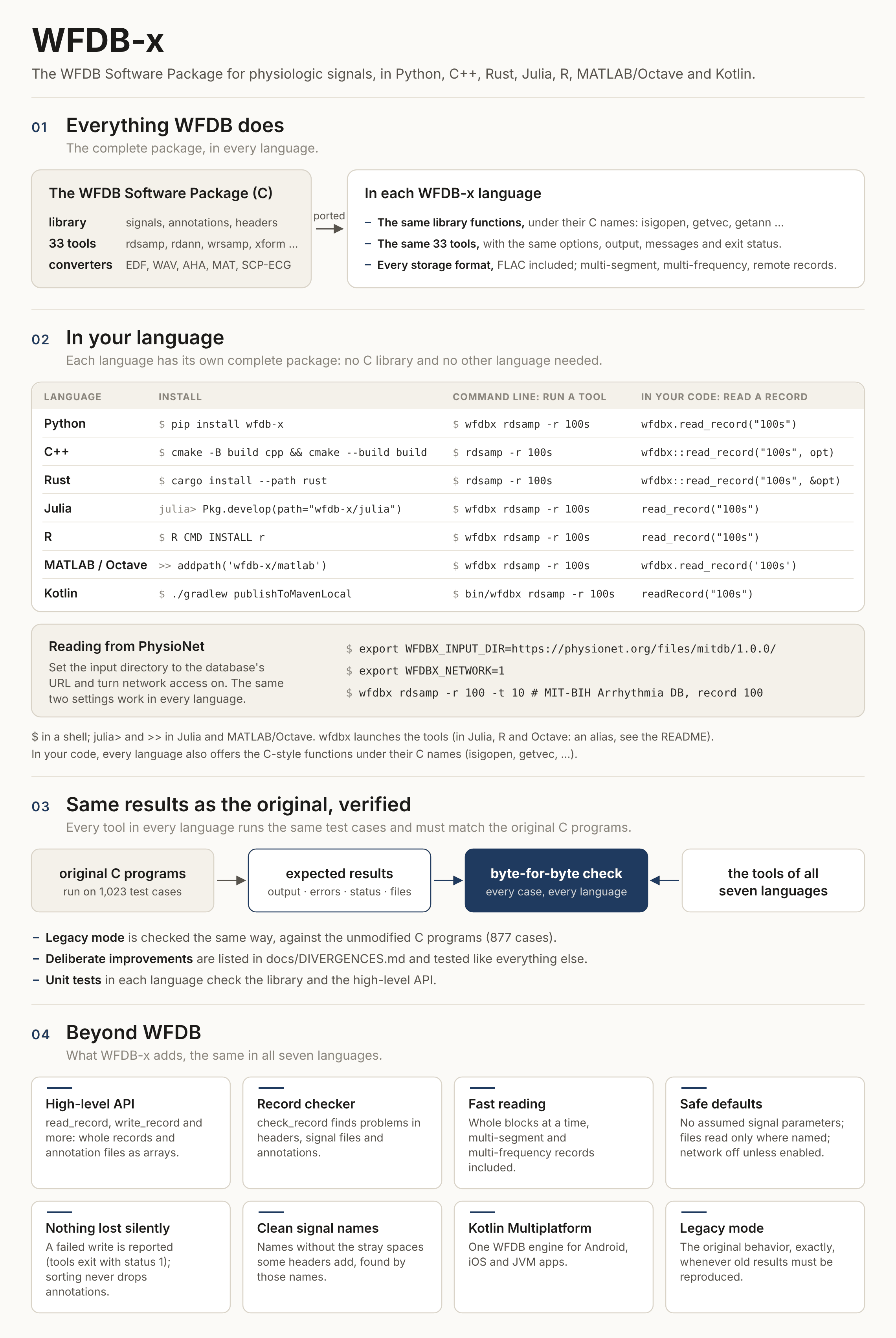
wfdbx reads and writes physiological signal records in the WFDB format used
by PhysioNet. It is a complete Python implementation
of the WFDB Software Package: the library and all of its command-line tools.
It reads and writes the same files as the original C library, and its tools
print the same output.
The package is pure Python. It needs Python 3.9 or later and NumPy, and runs on Linux, macOS and Windows.
Three ways to use WFDB-x
All three are written in Python; none of them calls the C library.
- The high-level functions (recommended).
read_record,read_header,read_annotations,write_record,write_annotationsandcheck_recordread and write whole records and annotation files as NumPy arrays, in one call, with keyword arguments, and raise exceptions on errors. They read signal files in large blocks, so they are the fastest way to read a record. They are an addition of WFDB-x: the C package has no equivalent. Use them for new code, analysis and notebooks. - The WFDB library functions under their C names (
isigopen,getvec,getann,putann, …), with the C behavior: sample by sample and annotation by annotation. Use them to port a program written against the C library, or for the exact C semantics. - The command-line tools (
rdsamp,rdann,wrsamp,xform, and 29 others), with the options, output and exit status of the C tools, run through thewfdbxcommand (wfdbx rdsamp -r 100s). Use them in shell scripts and pipelines, or to reproduce work done with the original tools.
The high-level functions return exactly the samples and annotations that the library functions (and the C library) give.
Installation
pip install wfdb-x                # the package and the wfdbx command
pip install "wfdb-x[examples]"    # also matplotlib and Jupyter, for the example notebooks
The package is imported as wfdbx. To install from a copy of the
repository, run pip install ./python.
Quick start
The package includes a sample record, 100s: the first minute of record 100
of the MIT-BIH Arrhythmia Database,
with two ECG signals at 360 Hz and its beat annotations.
import wfdbx

# Read the sample record from the package's data directory.
wfdbx.wfdbx_set_input_dir(wfdbx.sample_data_dir())

rec = wfdbx.read_record("100s", physical=True)   # signals in physical units
print(rec.fs, rec.names, rec.signals.shape)       # 360.0 ['MLII', 'V5'] (21600, 2)

hdr = wfdbx.read_header("100s")                    # the header only, no samples
print(hdr.nsig, hdr.nsamples)                      # 2 21600

ann = wfdbx.read_annotations("100s", "atr")        # beat annotations
print(len(ann), ann.symbols[:3], ann.samples[:3])  # 75 ['+', 'N', 'N'] [ 18  77 370]

# Write the first 10 seconds as a new record, "copy", in the current directory.
x = wfdbx.read_record("100s", sampto="0:10")       # ADC units
wfdbx.write_record("copy", x.signals, fs=x.fs, fmt=16, gains=x.gains,
                   baselines=x.baselines, adcres=[s.adcres for s in x.siginfo],
                   adczeros=[s.adczero for s in x.siginfo], units="mV",
                   names=x.names)
Reading and writing records
The examples in this section read the sample record 100s (the first minute
of record 100 of the MIT-BIH Arrhythmia Database, included with WFDB-x, in
the directory wfdbx.sample_data_dir()), and write records of their own in
the current directory.
Reading signals: read_record
wfdbx.wfdbx_set_input_dir(wfdbx.sample_data_dir())   # the sample record 100s
rec = wfdbx.read_record("100s", channels=["MLII"], sampfrom="0:10", sampto="0:20",
                        physical=True)
| Argument | Meaning | Default |
|---|---|---|
record |
record name or path (see Where files are read and written) | |
channels |
signals to read, by number or name (as in names) |
all signals |
sampfrom, sampto |
first sample, and the sample after the last one: a sample number (a whole number) or a time string (see below); sampto=None reads to the end |
the whole record |
physical |
return physical units (float64) instead of ADC units (int32) | False |
highres |
read a multi-frequency record at its highest sampling frequency | False |
pad |
replace invalid samples by the previous valid one | False |
checksum_warning |
warn when the data do not match the header’s checksums | True |
input_dir, network |
input directory and network access for this call only | the current settings |
legacy |
behave as the original package (see Legacy mode) | False |
Times can be sample numbers or WFDB time strings: "0:10" (10 seconds),
"1:02:03.5", "s3600" (sample 3600) or "e" (the end of the record).
The result is a Record:
| Field | Contents |
|---|---|
name |
the record name, as given to read_record |
signals |
NumPy array, one row per sample and one column per signal: int32 ADC units, or float64 physical units with physical=True |
fs |
sampling frequency in Hz (0 if the header gives none) |
names, units, gains, baselines |
description (without white space at either end, which some headers add), physical units, gain (ADC units per physical unit; 0 means uncalibrated) and baseline of each signal |
siginfo |
the full signal specifications (Siginfo objects) |
sampfrom |
the number of the first sample returned |
base_time |
start time and date as text, to the second, such as "[14:00:03 21/06/2024]" |
base_time_ms |
start time in milliseconds after midnight, such as 50403500 for 14:00:03.500 |
base_date |
start date as (year, month, day) |
comments |
the info strings of the header: its lines that begin with # after the record line (an empty or blank first line is not the record line) |
checksum_ok |
False if the data do not match the header’s checksums |
base_time, base_time_ms and base_date are None when the header does
not give them. Invalid samples are wfdbx.WFDB_INVALID_SAMPLE, or NaN in
physical units.
Reading a header: read_header
read_header(record) reads the header of a record without opening its
signal files. It returns a Header with these fields: name, fs,
counter_freq, base_counter, nsamples (0 if the header does not give
the length), nsig, siginfo, base_time, base_time_ms, base_date,
comments and metadata (the Key: value entries of the header, as
read_metadata returns them; see Header metadata).
The others have the same meaning as in Record.
wfdbx.wfdbx_set_input_dir(wfdbx.sample_data_dir())   # the sample record 100s
hdr = wfdbx.read_header("100s")
for s in hdr.siginfo:
    print(s.desc, s.fmt, s.gain, s.units)
Reading annotations: read_annotations
wfdbx.wfdbx_set_input_dir(wfdbx.sample_data_dir())   # the sample record 100s
ann = wfdbx.read_annotations("100s", "atr", sampfrom="0:10", sampto="0:30")
annotator is the file suffix ("atr" reads 100s.atr). The optional fs
gives the sampling frequency when the record has no header, or its header
gives none. The result is an Annotations object, in file order:
| Field | Contents |
|---|---|
record, annotator |
the record and annotator names, as given to read_annotations |
samples |
annotation times, in samples (int64) |
codes, symbols |
annotation codes (wfdbx.NORMAL, wfdbx.PVC, …) and their mnemonics ("N", "V", …) |
subtypes, chans, nums |
subtype, channel and annotator number of each annotation (int64) |
aux |
auxiliary text of each annotation, or None |
fs |
the frequency in which samples are counted (0 if unknown) |
Writing a record: write_record
import numpy as np
x = np.random.randn(3600, 2)                # random numbers, written as a record "rand"
wfdbx.write_record("rand", x, fs=360, fmt=16, physical=True,
                   gains=1000, adcres=16, units="mV", names=["A", "B"])
This writes the header rand.hea and the signal file rand.dat. The
sampling frequency, the gain and ADC resolution of each signal, and the
units of each calibrated signal are required; there are no defaults. A gain
of 0 marks a signal as uncalibrated, which is only allowed for samples given
in ADC units. Per-signal arguments take one value for all signals, or a list
with one value per signal.
| Argument | Meaning |
|---|---|
signals |
array with one row per sample and one column per signal; ADC units, or physical units with physical=True |
fs |
sampling frequency in Hz (finite, > 0) |
fmt |
storage format, such as 16, 212, 24 or 516 (FLAC; at most 8 signals); default 16. Every sample must fit it (below) |
gains, adcres, units |
gain (finite; 0 for an uncalibrated signal), ADC resolution in bits, and physical units |
baselines, adczeros, names |
optional signal specifications |
base_time, comments |
start time ("hh:mm:ss dd/mm/yyyy") and info strings |
metadata |
Key: value entries, written after the comments as # Key: value: a dict, or a list of (key, value) pairs (see Header metadata) |
samps_per_frame |
samples per frame of each signal, for a multi-frequency record; signals then has one row per frame and sum(samps_per_frame) columns |
dir |
directory in which to create the files |
Writing annotations: write_annotations
This example writes the annotation file rand.qrs for the record rand
written above:
wfdbx.write_annotations("rand", "qrs", samples=[100, 460, 820], symbols=["N", "N", "V"])
Give the annotation types as symbols or as codes. Both may be given
(as read_annotations returns them) if they agree: each symbol must be
that of its code (an empty symbol is not checked). The
times in samples must be integers within the range of a 64-bit integer.
subtypes, chans,
nums and aux are optional. Each of these arguments is one value for all
annotations, or a list with exactly one value per annotation; a list of any
other length raises ValueError before the file is created. As in C,
subtypes and annotator numbers are stored as signed bytes and channels as
unsigned bytes (other values wrap around). If the annotations are not in
time order, the file is sorted when it is written. sort=False keeps the
given order (without the library’s advice to run sortann) and sort=True
always sorts, for that call only. Without sort, the WFDBANNSORT
environment variable decides (sorting is on unless it is 0).
Header metadata
Many datasets store facts about a recording in the header, as comment
lines of the form # Key: value, such as # Age: 63 or # Dx: 164889003.
These functions read and change them, without touching the rest of the
header:
wfdbx.read_metadata("rec")                  # [("Age", "63"), ("Sex", "F")]
wfdbx.get_metadata("rec", "age")            # "63" (None if there is none)
wfdbx.set_metadata("rec", "Age", "64")      # replaces the line, or adds "# Age: 64"
wfdbx.remove_metadata("rec", "Sex")         # 1: the number of lines removed
wfdbx.update_metadata("rec", {"Age": "65", "Dx": None})   # several changes; None removes
- Reading. An entry is a comment line after the record line (an info
string, as
getinforeads it) that contains a colon. The record line is the first line that holds something other than spaces and tabs and does not begin with#, as the header parser finds it: an empty or blank line before it, and the comments before it, are not read. The key is the text before the first colon, the value the rest of the line, both without spaces at either end:#Age:45,# Age: 45and# Age : 45all give("Age", "45"). Comment lines without a colon are free comments: they are not returned, and never changed. Only the.heafile is read (not a.infofile). - Keys are compared without regard to letter case:
"age"findsAge. A key must not be empty, and must not contain:,#or a line break; it may contain spaces ("Date of birth"). If a header holds two entries whose keys differ only in letter case (written by other software), reading returns the first, with aUserWarning;set_metadataandupdate_metadatarefuse to change that key (ValueError), andremove_metadataremoves both. - Values are text, which may be a whole sentence, without a line break. Spaces at either end are removed; an empty value is allowed.
- Writing. An entry is written as
# Key: value(# Key:if the value is empty), with the spelling of the key given. A changed entry keeps its position; a new one goes after the last comment line of the header. Every other byte of the header is kept, including its line endings. The header is replaced in one step (through a temporary file), and all the arguments are checked first, so an error leaves it unchanged. - Files. The header is found as
read_headerfinds it (input_dirandnetworkwork the same way). A change is written to the header itself, or, withdir=..., to a header of the same name in that directory (the signal files are not copied). A header read from a URL can only be written elsewhere, withdir. For a multi-segment record, the master header is read or changed, unless a segment is named.
Metadata often holds information about patients. WFDB-x stores it as plain
text, exactly as given, and does not de-identify it. help(wfdbx.metadata)
gives the full rules.
Errors and warnings
- A record, header or annotation file that cannot be read or written raises
IOError. This includes a file that cannot be written completely, for example on a full disk: “write error on record REC”, “write error on annotator ANN for record REC”. (wfdbx_write_errors()counts such errors for the C-style functions, which report them only with a message, as in C.) - In
write_record, an empty record name, no signals (“at least one signal is required”), a sampling frequency that is not finite and greater than 0, a gain that is not finite (a gain of 0 marks an uncalibrated signal, and negative gains are allowed), abase_timethat cannot be parsed,samps_per_framevalues that are not integers of at least 1, a number of columns ofsignalsother than their sum, a list of per-signal values without one value per signal, samples in ADC units that are not integers (floats with whole values are integers) or that lie outside the range of a 32-bit integer, and samples in physical units that are infinite or whose ADC value lies outside that range, raiseValueErrorbefore any file is touched. So do an array of signals that is not 1-D or 2-D, baselines, ADC zeros and ADC resolutions that are not whole numbers within the range of a 32-bit integer, and a record name, signal names, units or comments with a character that is not Latin-1 (“units ‘μV’ has a character that is not Latin-1 (one byte per character)”). (NaN in physical units is an invalid sample.) So does a sample that the storage format cannot hold: outside its range (“signal 0 has a sample (40000) outside the range of format 16 (-32768 to 32767)”), or, in format 8, more than 127 away from the sample before it, or an invalid sample (format 8 has no invalid value); and more than 8 signals in a FLAC format, which a FLAC file cannot hold. (Until 1.2.3, such samples were silently wrapped around: 40000 read back as -25536.) The smallest value of a format (-32768 in format 16, -2048 in format 212) is the value of an invalid (missing) sample: samples equal to it, or toWFDB_INVALID_SAMPLE, are read back as invalid, andwrite_recordissues aRuntimeWarningfor them (“1 sample(s) of signal 0 will be read back as invalid (missing) samples (format 16 stores an invalid sample as -32768)”), except for the NaN samples of physical units, which mark missing samples deliberately;invalid_warning=Falseomits it. Inwrite_annotations,symbolsandcodesthat disagree (“symbols and codes disagree at annotation K”), an annotation time that is not an integer within the range of a 64-bit integer (NaN, an infinite value, a fraction or a huge value), or that is -263 or 263 - 1 (which the annotation file format reserves), NaN or None insamples,codes,subtypes,chansornums,samples(orcodes,subtypes,chans,nums) that are not 1-D, an annotation code outside 0 to 58 (“annotation code 61 is reserved”: 59 to 63 are the control codes of the format), aux texts that are not Latin-1, and anfsthat is not finite and greater than 0 raiseValueErrorbefore the file is touched. Whatever the outcome,write_recordandwrite_annotationsclose their output files and the library’s output signals and annotators before they return. write_recordandwrite_annotationswrite their files to temporary files in the destination directory (.NAME.XXXXXXXX.tmp), renamed over the destinations once all of them are complete: a failure while writing (a full disk, for example) leaves the existing files as they were, and no temporary file is left.- A negative
sampfrominread_recordandread_annotationsraisesValueError, and so does asampfromorsamptothat is not a whole number (a fraction, NaN or an infinite value), before any file is opened. Whatever the outcome,read_recordandread_annotationsclose their input files before they return. read_recordsets the getvec mode (highres,pad) for its own reading only: the mode in force before the call is restored afterwards.- A signal file that is shorter than its header says, or cannot be read,
raises
IOError: “can’t read signal data of record REC (getvec status -3)”, also when the checksums do not match either (the C functiongetvecthen reports the checksum error, -4, for the incomplete last frame); an incomplete frame is never returned.read_recordallocates memory for the samples as it reads them, not for the length that the header gives. - An annotation file that ends before its end-of-file marker raises
IOError: “can’t read annotation file ANN of record REC (getann status -3)”. - Invalid arguments, and a value the operation needs but the record does not
give, raise
ValueError. For example, a time string such as"0:10"needs the sampling frequency, andphysical=Trueneeds the gain of each signal. - When the data do not match the checksums in the header,
read_recordreturns all the data and issues aRuntimeWarning: “checksum error in record REC: the signal data do not match the checksums in its header”.checksum_warning=Falseturns the warning off;rec.checksum_okisFalseeither way. Checksums are only checked when a read reaches the end of the record. - A tool, or a program that uses the WFDB library functions, never writes a
signal file over one of the signal files it is reading. Opening such an
output fails with “output file NAME is also an input file”.
write_recordreads nothing, so it overwrites any existing files of the same name.
The high-level functions call wfdbquit(), which closes anything opened
with the WFDB library functions.
Checking a record: check_record
wfdbx.wfdbx_set_input_dir(wfdbx.sample_data_dir())   # the sample record 100s
report = wfdbx.check_record("100s", ["atr"])
print(report)
check_record(record, annotators) checks the header of a record, its signal
specifications, every sample of its signal files, and the annotation files
named. It reports each problem it finds. It never raises an exception for a
problem in the record. It checks for problems similar to those found by
Benjamin Moody’s wfdbcheck.
The result is a CheckReport. report.ok is True if there is no error.
report.issues lists the problems. Each has a severity, a code (such as
"checksum"), a where ("" for the record, "signal 1", "segment s2",
"annotator atr") and a message.
| Severity | Meaning |
|---|---|
error |
the record is damaged or does not follow the WFDB format: programs will read wrong data or fail |
warning |
the record can be read, but something is missing or unusual, and may give wrong results |
info |
a fact worth knowing, such as invalid (missing) samples |
Printed, the report has one line per problem, or the line
no problems found:
warning: signal 0: the units are not specified
error: signal 1: the checksum does not match: the header gives 12, the samples sum to 13
error: annotator atr: 3 annotations are out of order; the first is at sample 50, after sample 100
report.lines() returns these lines as a list. The lines are the same in
the seven languages of WFDB-x. The checks run in normal mode, even if legacy mode is on, and the library
prints no messages during the call.
What is checked:
- the header: that it can be read, the sampling frequency, the length, lines of at most 255 characters, and the record name it gives;
- each signal: description, gain, units, ADC resolution and range, storage format, and signal file name;
- the signal files: that they can be read, samples outside the ADC range, invalid samples, checksums, and the length given in the header;
- each segment of a multi-segment record, and its signals against the record’s;
- the annotation files: that they can be read to the end, time order, annotation codes, and annotations after the end of the record.
The sample record 100s gives two warnings: its header gives no units.
Where files are read and written
WFDB-x reads and writes files exactly where they are named, and nowhere else:
| The name is | It is read from | It is written to |
|---|---|---|
a full path: /data/mitdb/100, C:\data\100 |
that path | that path |
a home path: ~/data/100 |
the user’s home directory | the user’s home directory |
a URL: https://.../100 |
that URL, if network access is on | (URLs cannot be written) |
anything else: 100, mitdb/100, ../data/100 |
the input directory | the output directory |
In this table, /data/mitdb stands for a local copy of the MIT-BIH
Arrhythmia Database, and 100 for its record 100.
The input and output directories are both the current directory unless they are set:
| Setting | Function | Option of the high-level functions | Environment variable |
|---|---|---|---|
input directory: a local directory, ~/... or a URL |
wfdbx_set_input_dir(d) |
input_dir= |
WFDBX_INPUT_DIR |
| output directory | wfdbx_set_output_dir(d) |
dir= |
WFDBX_OUTPUT_DIR |
| network access (off by default) | wfdbx_set_network(1) |
network=True |
WFDBX_NETWORK=1 |
A function call overrides the environment variable, and an option applies to
that one call. wfdbx_get_input_dir(), wfdbx_get_output_dir() and
wfdbx_get_network() return the current settings, and passing None to a
set function restores the default.
In this example, /data/mitdb stands for a local copy of the MIT-BIH
Arrhythmia Database, which contains record 100:
wfdbx.wfdbx_set_input_dir("/data/mitdb")
rec = wfdbx.read_record("100")          # reads /data/mitdb/100.hea and 100.dat
wfdbx.write_annotations("100", "qrs", samples=[100, 460], symbols=["N", "N"],
                        dir="out")       # writes out/100.qrs
The signal files that a header names are read from the header’s directory.
Record names
A record name is given without the .hea extension (a trailing .hea is
removed, by the readers and by write_record). It is one of:
- a full path, absolute (
/data/mitdb/100) or in the home directory (~/Documents/100s), used as given; - a relative path (
100s,data/100s), read from the input directory if one is set, otherwise from the current directory, and written to the output directory if one is set, otherwise to the current directory (missing directories are created); - a URL (
https://physionet.org/files/mitdb/1.0.0/100), read only if network access is on; a URL cannot be written.
The input_dir option is optional, and applies to relative names only, not
to full paths or URLs. A writer given a name with a path creates the files
in that directory, and the header names the record and its signal file
without the path (rec, rec.dat), so that the record opens under any
path that leads to it; in legacy mode, as in the original, the header gives
the name with its path. With the dir option, the name must be a plain
name (rec): the files are created in dir, and the record opens from that
directory under its plain name.
A record name is made of letters, digits, _, - and ~. / separates
directories, and the names of directories may contain any characters, such
as dots: my.data/rec is a valid record name, rec.1 is not. A name whose
last part contains a dot is the name of a file: 100s.hea is read as the
header of record 100s, and 100s.edf as an EDF file.
Records can be written under any such name: write_record("my.data/rec",
...) creates my.data/rec.hea and my.data/rec.dat. The header names the
record and its signal file without the directory (rec, rec.dat), so the
record can be read under any path that leads to it. Annotator names may
contain letters, digits, _, - and ~.
Reading from PhysioNet
Set the input directory to the URL of the database and turn network access
on. The URL of a database is https://physionet.org/files/<database>/<version>/.
This example reads record 100 of the MIT-BIH Arrhythmia Database:
rec = wfdbx.read_record("100", input_dir="https://physionet.org/files/mitdb/1.0.0/",
                        network=True)
A remote file that has been read is kept for the rest of the session; one that could not be read is requested again the next time it is opened. A download gives up when it cannot connect, or receives nothing, for 30 seconds. Only http:// and https:// URLs can be read: a name that begins with another URL scheme, such as ftp:// or sftp://, is refused, with or without network access, and never read as a local file name (mount the server as a local folder, e.g. with sshfs or rclone, or download the files).
Signal parameters
WFDB-x never assumes a sampling frequency, gain, ADC resolution or units
that a record does not give. Where one is needed, it must be given: in
write_record, as the fs argument of read_annotations, or as an option
of the tools (see below). A record whose header gives no frequency has fs =
0. See
DIVERGENCES.md
for the reasons.
Command-line tools
Run a tool through the wfdbx command. These examples read the sample
record, so they first set the input directory to the package’s data
directory:
export WFDBX_INPUT_DIR=$(python -c "import wfdbx; print(wfdbx.sample_data_dir())")
wfdbx rdsamp -r 100s -t 10 -p      # print the first 10 seconds, in physical units
wfdbx rdann -r 100s -a atr         # print the annotations
wfdbx --list                       # list the tools
The tools have the options and output of the original WFDB tools, which are
described in the WFDB Applications Guide
(third_party/wag.pdf):
- signals:
rdsamp,wrsamp,wfdbdesc,sigamp,snip,xform,sampfreq,signame,signum,wfdbcat,wfdbwhich - times:
wfdbtime,time2sec - annotations:
rdann,wrann,sortann,ann2rr,rr2ann - converters:
edf2mit,mit2edf,rdedfann,wav2mit,mit2wav,wfdb2mat,a2m,m2a,ad2m,md2a,ahaecg2mit,makeid,readid,revise,parsescp
When an output file or the standard output cannot be written (a full disk, for example), a tool reports it and exits with status 1, as the standard Unix tools do (the original tools exited with status 0).
The tools use the environment variables of the table above, also for the
files that they read or create themselves: the -i file of wrsamp,
edf2mit, wav2mit, a2m and ad2m, the input files of ahaecg2mit and
the -S script of xform are read from the input directory, and the WAV
file of mit2wav, the EDF file of mit2edf, the master header of snip -m
and the .des, .ecg, .key and .txt files of parsescp are created in
the output directory, as the records they read and write are. Such a file
cannot be read from a URL. wfdbx_input_path(name) and
wfdbx_output_path(name) return the path where a program of its own should
open such a file.
To read record 100 of the MIT-BIH Arrhythmia Database from PhysioNet:
export WFDBX_INPUT_DIR=https://physionet.org/files/mitdb/1.0.0/
export WFDBX_NETWORK=1
wfdbx rdsamp -r 100 -t 0:05
Tools that write signal parameters require them as options:
| Tool | Required options |
|---|---|
wrsamp (with -o) |
-F frequency, -G gain, -R ADC resolution, and -U units for calibrated signals |
wav2mit |
-G gain, and -U units unless the gain is 0 |
ad2m, ahaecg2mit |
-F, -G, -R, and -U unless the gain is 0 |
a2m, rdann, ann2rr, sortann, m2a |
-F frequency, when the record’s header does not give one |
For example, wfdbx wrsamp -F 250 -G 200 -R 16 -U mV -i samples.txt -o rec
writes a record, rec, from the columns of numbers in the text file
samples.txt.
The WFDB library functions
Every function of the WFDB library is available under its C name, with the
same arguments and return values, so programs and documentation written for
the C library carry over directly. Where a C function fills an array, the
Python function fills a list passed by the caller. This example reads the
sample record 100s (the first minute of record 100 of the MIT-BIH
Arrhythmia Database, included with WFDB-x):
import wfdbx as w

w.wfdbx_set_input_dir(w.sample_data_dir())   # the directory of 100s

si = []
nsig = w.isigopen("100s", si, 2)     # open 2 signals; si receives their specifications
v = [0] * nsig
while w.getvec(v) > 0:               # v receives one sample per signal
    ...

a = w.Annotation()
w.annopen("100s", [w.Anninfo("atr", w.WFDB_READ)])
while w.getann(0, a) == 0:
    print(a.time, w.annstr(a.anntyp), a.aux_string())
w.wfdbquit()
Differences from C that come from the language:
- Strings are
str. Text and binary data are handled as ISO-8859-1, so every byte sequence round-trips unchanged. - An annotation’s
auxisNone, orbyteswhose first byte is the length of the text that follows, as in C.Annotation.aux_string()returns the text. getframes(n)reads up tonframes at once, asncalls ofgetvecwould, but decoding whole blocks of the signal files (also for multi-frequency and multi-segment records). It returns a NumPy array with one row per frame, and thegetvecstatus of the first frame it could not read. If it read allnframes, the status is the number of signals.getseginfo()returns a list ofSeginfoobjects.- Errors are reported by return values, as in C, not by exceptions.
wfdberror()returns the last message, andwfdbquiet()stops the messages from being printed. - The library keeps the open record and annotators between calls, as in C.
wfdbquit()closes them; the directory and network settings are kept, and so are the time resolution of output annotators (getafreq()), which opening an EDF record sets to its sampling frequency when none is set, and the getvec mode (getgvmode()), to which it addsWFDB_HIGHRES, as in C. The high-level functions (read_record,read_header,read_annotations,write_record,write_annotations,check_record) leave both as they were.
The annotation codes (NORMAL, PVC, …) and the functions of
<wfdb/ecgmap.h> (isqrs, map1, map2, …) are also provided. Use
help() on any function for its documentation.
Legacy mode
Legacy mode reproduces the original WFDB package exactly, including its assumed signal parameters and its search for files. Use it only to reproduce old results:
- tools:
--legacyas the first argument, as inwfdbx rdsamp --legacy -r 100s, run in the directory of the sample record100s(wfdbx.sample_data_dir()). Legacy mode finds files through the WFDB path, which begins with the current directory, and does not use the input directory (the files that a tool reads itself are opened as named, relative to the current directory); the output directory, if set, is a prefix of every output name, those of the files that a tool creates itself included; - high-level functions:
legacy=True; - the whole library:
wfdbx_set_legacy(1).
DIVERGENCES.md describes what changes in legacy mode.
Example notebooks
The package includes seven Jupyter notebooks. Each runs without a network connection.
| Notebook | Contents |
|---|---|
01_getting_started |
reading headers and signals; ADC and physical units |
02_annotations_and_heart_rate |
reading annotations; RR intervals and heart rate |
03_writing_records |
writing records and annotations |
04_command_line_tools |
running the tools |
05_c_library_api |
the WFDB library functions |
06_physionet_records |
reading a record from PhysioNet |
07_legacy_mode |
the original package’s behavior, on request |
Copy them to a directory and open them with Jupyter:
wfdbx --examples my-examples
cd my-examples
jupyter lab
Notes
- FLAC. Formats 508, 516 and 524 (FLAC-compressed signals) are read and written without any external library. The C library reads files written by WFDB-x with identical sample values, although the compressed bytes differ from those of libFLAC.
- Speed.
read_recordandwrite_recordwork on whole blocks of samples with NumPy: they read an hour of a two-signal ECG record in a few hundredths of a second, about as fast as wfdb-python. Reading sample by sample withgetvecis much slower in Python; preferread_record(in chunks, withsampfromandsampto, for records too large for memory). BENCHMARKS.md compares the seven languages and wfdb-python.
Testing
From the root of the repository:
pip install -e "./python[test]"
pytest python/tests
This runs the unit tests, the example notebooks and the cross-language
conformance suite (about 1000 command-line cases, a few minutes). Set
WFDBX_CONFORMANCE=0 to skip the conformance suite, or, for example,
WFDBX_CONFORMANCE=rdsamp,rdann to run the cases of some tools only. The
conformance suite can also be run on its own, with more options (see
conformance.md):
python3 tests/conformance/harness.py check --impl python
The tests that write to /dev/full (write errors) are skipped where it does
not exist, on macOS and Windows.
Authors and license
WFDB-x implements version 10.7.0 of the WFDB Software Package.
The WFDB library and tools were written by George B. Moody, with revisions by
Benjamin Moody and contributions from many others; parsescp was written by
George B. Moody and Edna S. Moody. Each module names the authors of the C
code it implements, and
AUTHORS.md
gives the details. The Python implementation was developed by Reza Sameni
(2026), through AI-assisted development, cross-language
verification and unit testing.
WFDB-x is an independent reimplementation. Its Python code is a translation of the C code of the WFDB Software Package into Python, written for WFDB-x; it is not code by the original WFDB developers. It follows the original’s logic and behavior, with the changes described in DIVERGENCES.md. The authors of the original C code are credited in each file and in AUTHORS.md.
The WFDB-x library is distributed under the GNU Lesser General Public
License, version 2.1 or (at your option) any later version
(LICENSE): programs under any license, proprietary ones
included, may use it on the LGPL’s terms. The command-line tools (the
apps and the wfdbx command), translations of the tools of the original
package, are distributed under the GNU General Public License, version 3 or
(at your option) any later version
(LICENSE-GPL). Each source file states its license.
The file
NOTICE,
included in the package with both licenses, summarizes this and gives the
copyright notice and license (BSD-3-Clause) of libFLAC 1.4.3, whose stream
decoder the FLAC decoder of wfdbx translates.